Introducing Budgets: Tracked Live in Digits

Finance teams spend weeks building budgets for the quarter or year. They get presented, approved, maybe even celebrated. Then they go into a folder.
A budget's job is to keep teams on plan, and that only works if everyone knows what's been spent so far. Finding out is a chore. Someone exports actuals from the ledger, pastes them next to the budget, rebuilds the formulas, and chases down the variances. So it happens once a month at best, and in between, budget owners are flying blind. By the time anyone learns marketing is 14% over, the money is already spent.
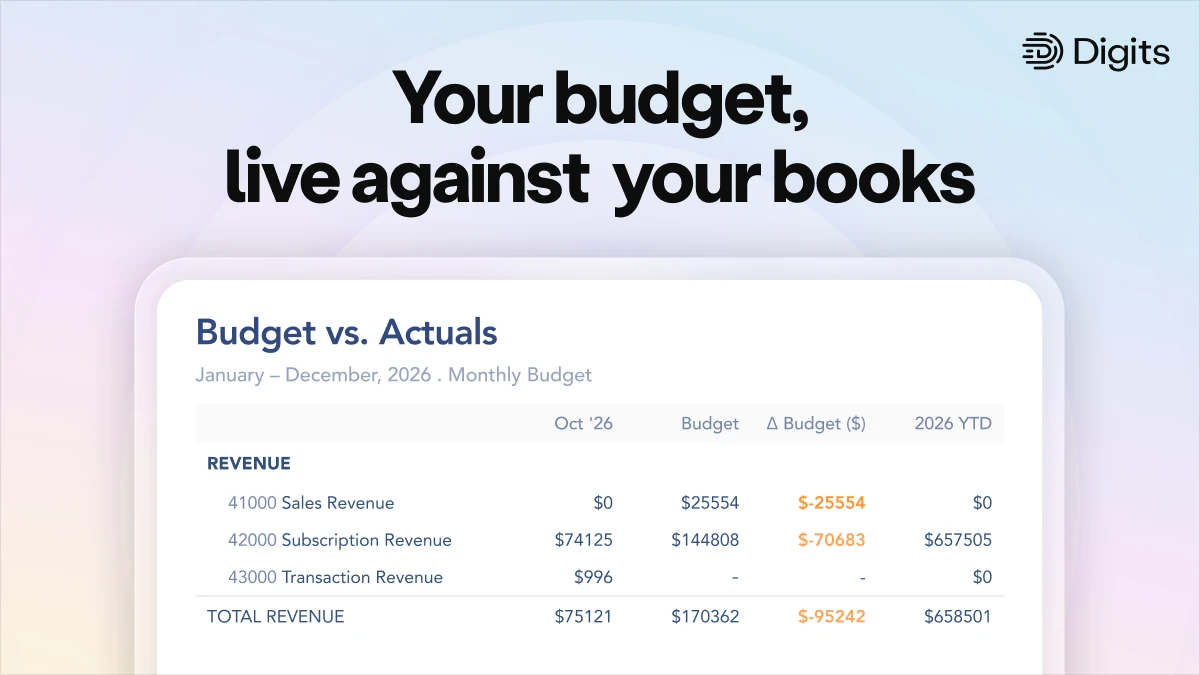
What if your budget updated itself every time a transaction hit the books? Today we're launching Budgets in Digits Pro. Bring the budget you already have, and Digits keeps Budget vs. Actuals current as your books change. Variance stops being a month-end project. It's done for you.
Bring your budget in as-is
Most budgets are built in Excel, and most budgeting tools make you rebuild them in a template format before you can import them. In an AI-native platform, you just bring your budget as it is and Digits does the rest. No reformatting, no template.
Digits reads real-world budget spreadsheets. Monthly or quarterly period grids, single annual amounts, or multi-tab workbooks.
AI maps it, math checks it. AI figures out the layout; deterministic code reads the amounts and verifies them against the workbook's own subtotals and totals. Every imported number traces back to its source cell.
Matches to your books automatically. Rows map to your chart of accounts, including account numbers. Anything ambiguous gets flagged for a human, not guessed.
QuickBooks budgets come with you. Budgets in a connected QuickBooks file import automatically during sync.
Works where your documents land. Upload from Budgets, or drop the file into your document vault — Digits recognizes it as a budget and imports it. You get notified when it's ready.
AI for the messy part, math for the part that has to be right
Spreadsheets are messy: merged headers, subtotal rows, a tab someone added in March. That's a job for AI, and Digits uses it to understand the layout of your workbook.
Reading the numbers is a different job. Deterministic code pulls every amount and checks it against the workbook's own subtotals and totals. If your spreadsheet says operating expenses total $1.2M, the imported budget has to agree. Every number traces back to its source cell.
It’s the same principle behind the rest of Digits: AI removes the tedium, verifiable math handles the calculations, and humans review anything that has to tie out.
Budget vs. Actuals, always current
Digits keeps your ledger current around the clock, so your Budget vs. Actuals is live too. Book a transaction and the comparison moves with it, immediately.
The full picture in one statement: period budget vs. actual, year-to-date, full-year budget, remaining budget and percent of budget used, side by side.
Variance your way: as a dollar amount, a percent, or both, for the period and YTD.
The trend at a glance: actual net income as bars against the budget line, period by period.
Where to look first: Top Category Variances surfaces the categories furthest over or under plan.
Fiscal-year aware: YTD follows your fiscal year, not just the calendar.
Built for how finance teams actually plan
Budgets change, so Digits keeps every version of them. Each upload adds a new version, whether it’s the original plan, a re-forecast, or the board-approved number. You can name versions, switch between them, and compare any one to actuals. Digits follows the latest version by default and never overwrites your history.
Budgets also live next to your actuals: add Budget vs. Actuals to the P&L, drop budget statements into report packages, and export to PDF or Excel in one click. Because budgets follow your chart of accounts hierarchy, parent categories total their children automatically, the same way your books roll up.
When the team needs to discuss a number, comments sit on the budget itself, and an activity log shows every upload, new version, and rename.
For accounting firms
Budget vs. Actuals is one of the most common client requests, and one of the most manual to deliver. Client budgets live spreadsheets; actuals live in the ledger; the variance report gets rebuilt every month.
With Budgets, you load a client's budget exactly as they sent it and report variance automatically.
Availability
Budgets is available today on Digits Pro, $250/month, for businesses and for accounting firm clients. Pro includes everything in Core plus Budgets, Custom Reports and Custom Dashboards.
Today: budgets by category (your chart of accounts), uploaded from a spreadsheet or synced from QuickBooks, with live Budget vs. Actuals, versions, reporting and export.
Coming Soon: dimensional budgets, so you can budget by department or location. It's the most common follow-up request we hear, and it's already on our roadmap. In the meantime, Reach Reporting integrates with Digits and works for dimensional budgets.
Currently Unplanned: building or editing budget line amounts inside Digits, forecasting, scenarios and approval workflows. To change a budget, upload a new version. For forecasting and scenario planning, Reach Reporting integrates with Digits and works from your live books.
Building your 2027 plan right now? Bring it in.
Jeff Seibert is the founder and CEO of Digits, the world's first AI-native accounting platform. He previously served as Twitter's Head of Consumer Product and starred in the Emmy Award-winning Netflix documentary The Social Dilemma.
Jeff was co-founder and CEO of the mobile performance analytics company Crashlytics, which was acquired by Twitter in 2013. Now owned by Google, Crashlytics runs on over 6 Billion monthly-active smartphones and is the market-leading crash reporter for both iOS and Android.
A self-taught programmer, Seibert released his first app at the age of 13 and went on to graduate from Stanford with a B.S. in Computer Science. He's angel-invested in almost 100 startups and was named one of Insider's Top 100 Seed VCs in 2021.


Stay up to date with Digits
Unsubscribe anytime.